1. DI (의존성 주입) 이란?
DI가 무엇인지 설명하기 앞서 한 가지는 확실히 하고 가야 한다.
DI는 spring만의 특별한 방식은 아니다.
프로그래밍을 하는 여러 기법들 중에서 DI라는 것이 존재하는데, 그 DI를 spring에서 채택한 것이다.
사실 DI (Dependency Injection ; 의존성 주입)은 우리에게 낯설지 않다,
오히려 굉장히 친숙한 개념이다.
아래 java code를 보자.
class A{
	private B a;
    public A(B a) { this.a = a; }
    public setA(B a) { this.a = a; }
}
A라는 class가 가지고 있는 field a에 값을 주입(injection)할 수 있는 방법은 2가지가 있다.
하나는 constructor의 parameter를 이용하는 방법이고,
하나는 setter를 이용하는 방법이다.
결국 A는 어떤 방법이든 B라는 class의 instance가 없으면 아무 기능도 하지 못 한다.
B가 A에 의존성 주입(injection)을 해줘야만 기능을 할 수 있는 것이다.
사실 여기까진 우리가 java를 하면서 알게 모르게 사용하고 있었다.
2. spring에서의 DI
위에서 설명한 DI의 개념을 그대로 가져와서 spring에 적용해보자.
갑의 위치에 있는 곳에서 필요한 것을 주입(injection)해주지 않으면 을의 위치에 있는 곳은 작동하지 못 한다.
spring에서 갑은 'container(컨테이너 ; IoC ; Inversion of Control) 이다.
spring container에는 이미 bean이라는 이름으로 수많은 object들이 생성되어 있다.
java file에서는 container(IoC)에 있는 beans를 필요에 따라 getBean() 해서 사용한다.
따라서 java file은 container에 object (bean)이 없다면 사용할 수가 없다.
-> container가 java file에 object (bean)을 주입(injection)한다.
3. spring 에서의 DI 설정 방법
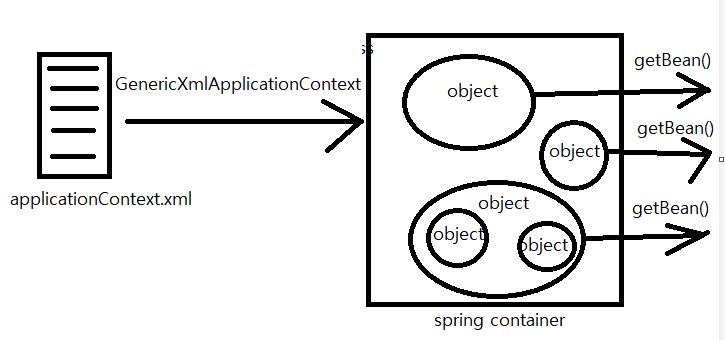
spring container 생성 및 bean object 호출 과정을 표현해봤다.
applicationContext.xml 에서 어떤 bean을 생성할지 적어두면,
new GenericXmlApplicationContext("classpath: applicationContext.xml") 을 통해 container에 생성하고,
필요하면 getBean()을 통해 가져와서 사용한다.
(1) Constructor : spring에서 <constructor-arg ref=""> 를 통한 DI
spring의 DI는 이 전체 과정에서 applicationContext.xml 파일을 보면 알 수 있다.
<beans xmlns="http://www.springframework.org/schema/beans"
	xmlns:xsi="http://www.w3.org/2001/XMLSchema-instance"
	xsi:schemaLocation="http://www.springframework.org/schema/beans
	http://www.springframework.org/schema/beans/spring-beans.xsd">

    <bean id="studDao" class="ems.member.dao.StudentDao></bean>

    <bean id="registerService" class="ems.member.dao.StudentRegisterService">
    	<constructor-arg ref="studDao"></constructor-arg>
    </bean>

    <bean id="modifyService" class="ems.member.dao.StudentModifyService">
    	<constructor-arg ref="studDao"></constructor-arg>
    </bean>

    <bean id="deleteService" class="ems.member.dao.StudentDeleteService">
    	<constructor-arg ref="studDao"></constructor-arg>
    </bean>

    <bean id="selectService" class="ems.member.dao.StudentSelectService">
    	<constructor-arg ref="studDao"></constructor-arg>
    </bean>

</beans>
이렇게 container (IoC)에서 bean을 생성할 때, <constructor-arg>를 통해 의존성 주입을 할 수 있다.
위에서 java code에서 constructor를 통해 DI를 구현하는 것과 다르지 않다.
그저 spring에서는 container에 object를 생성하기 때문에 차이점이 존재할 뿐이다.
(2) Setter : <bean id="" class=""> <property name="" value="" /> </bean>
spring에서도 setter를 이용한 DI가 가능하다.
일반 java code에서 jdbcUrl과 jdbcId를 바꾼다고 생각해보자.
public void setJdbcUrl(String jdbcUrl){
	this.jdbcUrl = jdbcUrl;
}
public void setJdbcId(String userId){
	this.userId = userId;
}
이런 방법으로 간단하게 진행하면 된다.
이건 지금까지 무수히 많이 해온 과정이기 때문에 그리 어려울 것이 없다.
이걸 spring에 적용해보자.
applicationContext.xml file에 수정을 하면 된다.
<bean id="dataBaseConnectionInfoDev" class="ems.member.DataBaseConnectionInfo">
	<property name="jdbcUrl" value="jdbc:oracle:thin:@localhost:1521:xe" />
    <property name="usrId" value="scott" />
</bean>
<bean>에서 어떤 class의 instance이고 id는 무엇인지 찾고, 그 것의 <property>를 변경시켜준다.
name="" 무엇인지 찾고 그 값 value=""를 통해 변경시켜준다.
value=""라고 하면, 단순히 값의 대입이다.
만약 bean의 class에 setUserId(userId) 에서 userId 자체가 하나의 bean이라면 value="" 말고 ref=""로 넣어줘도 된다.
(+참고)
실제로 DB와의 connection 정보를 담당하는 객체는 DataBaseConnectionInfo 같은 이름으로 되어있다.
조금 더 정확히 말하면, DataBaseConnectionInfo.java file이 존재하는데, 이 class에서는 DB에서 가져와야 할 정보들을 담고 있다.
spring이기 때문에 new로 instance를 만들지 않고,
new GenericXmlApplicationContext("classpath: applicationContext.xml") 로 container에 class="BataBaseConnectionInfo"인 bean을 생성하고 그 bean을 이용한다.
이 때 이 bean 안에는 각 field를 병경할 수 있는 setter들이 있다.
이 setter들을 <bean id="" class=""><property id="" value="" /></bean> 같은 형태로 사용하는 것이다.
(+참고)
생성된 bean의 id가 dataBaseConnectionInfoDev 인데, 여기서 Dev는 dev server를 의미한다.
즉, 개발을 위해 만들어진 server를 의미한다.
반대로 dataBaseConnectionInfoReal 이라는 이름 bean을 만들어 real server도 만들 수 있다.
해당 코드가 개발용 dev server에 영향을 줄지, 실제 서비스 중인 real server에 영향을 줄지 선택할 수 있는 것이다.
(2-1) parameter type List<> : <bean id="" class=""><property name=""> <list> <value>
만약 들어오는 값이 List type이라면?
이게 무슨 말이냐면
public void setDevelopers(List<String> developers){
	this.developers = developers;
}
단순히 이렇게 parameter의 type이 List<> 인 형태를 말하는 것이다.
사실 들어오는 type이 다를 뿐, 이것도 결국 setter이다.
따라서 spring에서 큰 틀은 같다.
<bean id="dataBaseConnectionInfoDev" class="ems.member.DataBaseConnectionInfo">
	<property name="developers">
    	<list>
        	<value>Park</value>
            <value>Kim</value>
            <value>Lee</value>
            <value>Choi</value>
        </list>
    </property>
</bean>
단순히 <peroperty name="developers" value=""> 의 형태로 넣으려고 하니,
developers의 type인 List<String> 에는 값이 여러 개 들어있다.
따라서 하나 하나 따로 넣어줘야 한다.
List type이기 때문에 <list> tag를 사용해주고, 그 list 안에서 각각의 value를 <value> tag를 통해 넣어주면 된다.
(2-2) parameter type Map<,> : <bean> <property name=" "> <map> <entry> <key> <value> <value>
parameter type이 LIst<>인 경우를 (2-1)에서 다뤘다.
<bean> <property> <list> <value> 를 통해서 다룬다고 했다.
그러면 Map<,> type도 생각해 볼 수 있다.
<bean> <property> 안에 <list>가 아닌 다른 형태가 들어갈 것 같다는 생각 정도 해볼 수 있다.
실제로도 그렇다.
<bean id="" class="">
	<property name="administrators">
    	<map>
        	<entry>
            	<key><value>1</value></key>
                <value>kim@springPjt.org</value>
            </entry>
            <entry>
            	<key><value>2</value></key>
                <value>park@springPjt.org</value>
            </entry>
        </map>
    </property>
</bean>
<map>이라는 tag를 통해 Map type의 data를 받을 수 있다.
Map<,> 의 경우 key, value 총 2가지의 값을 가지고 있기 때문에 나눠서 받아야 한다.
key, value 한 세트를 entry라고 하기에 entry tag를 사용한다.
<map> <entry> 안에서 <key>와 <value>를 받으면 된다.
여기서 주의할 것은 <key>의 값을 받는 방법은 key tag 안에서 <value>를 이용해야 한다는 점이다.
여기서도 당연히 value 값으로 값 자체를 넣어주는 것이 아니라 bean 객체를 넣어주고 싶다면,
<map>
	<entry>
    	<key><value>1</value></key>
        <ref bean="beanName">
	</entry>
    // ...
</map>
이런 식으로 ref tag로 bean을 넣어줘도 된다.
'Web > Spring' 카테고리의 다른 글
| 7. [스프링] Bean 과 Singleton(싱글톤)의 관계 (0) | 2022.02.02 |
|---|---|
| 6. 스프링 설정 파일 (applicationContext.xml) 분리해서 관리하기 (0) | 2022.02.02 |
| 4. 이클립스 없이 spring 프로젝트를 만드는 방법 (0) | 2022.02.01 |
| 3. spring 으로 첫 프로젝트를 만들어보자 (0) | 2022.02.01 |
| 이클립스 xml 파일 생성 안 될 때! xml 폴더 없을 때! (0) | 2022.02.01 |

